Two ways to cover many pages
If you manage a blog, documentation site, or product catalog, both approaches can produce per-page images. A template workflow does not mean opening a design editor for every URL.
| Workflow | URL-based MyOG | Template-based generation |
|---|---|---|
| Initial setup | Add your domain and install the generated integration snippet. | Choose or design a layout, then connect data to its fields. |
| Per-page input | The page URL; MyOG reads the page's metadata and available brand signals. | Text and image values supplied by your CMS, code, API, or integration. |
| Visual control | Built-in layouts using detected content, with fallback behavior. | You control the layout and field mapping within the tool's capabilities. |
| Ongoing work | Keep source pages readable and their metadata accurate. | Maintain the layout and data connection as your content changes. |
For example, Bannerbear's API accepts a template and layer modifications, and Placid's API accepts a template and layer data. Vercel OG generates images from HTML and CSS you define. Those inputs can come from code rather than manual entry.
For tool-specific details, use our existing comparisons with Bannerbear, Placid, and Vercel OG.
What MyOG reads from a URL
MyOG extracts page metadata such as the title and description, looks for a favicon and font signals, and uses available assets to compose an image. Built-in layouts can include a page screenshot. You can choose a layout without designing one yourself.
Detection depends on what the page exposes. Missing metadata, login walls, bot protection, or a failed screenshot can reduce the page-specific detail. Some layouts use fallback artwork or a domain card when a screenshot is unavailable; detected colors and fonts may differ from your exact brand guidelines.
For production use, register your domain in MyOG and keep available credits. Follow the integration guide for your platform so each page's crawler-visible og:image tag points to the generated image for that URL. Generation does not replace installing the tag.
A public page example
Our New York Times social preview audit includes this MyOG-generated card for the World section. The saved sample combines "World News", the source domain, and a page screenshot.
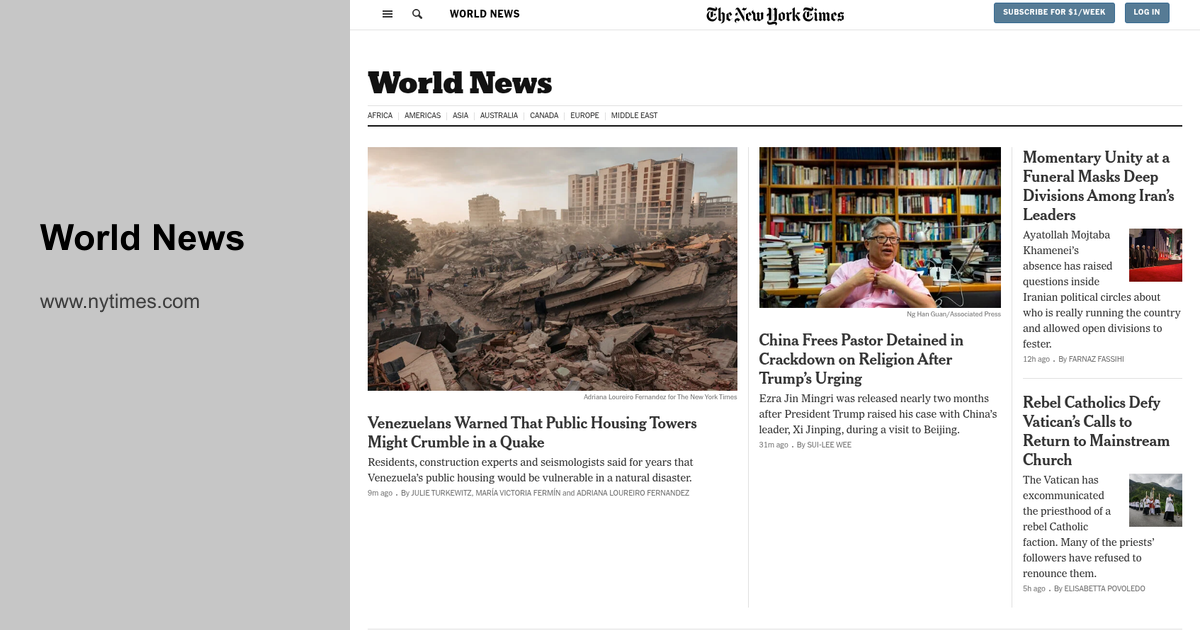
A section title can distinguish a shared link from a generic site card. Keep an existing image when it already explains the page well. The audit shows a generated alternative; it does not establish a traffic or conversion lift.
Choose the workflow for your site
Use URL-based generation when your pages already contain useful titles and brand assets, and you want per-page cards without maintaining a separate design and field mapping. Use templates when you need precise placement, campaign-specific artwork, or content from data that is not on the public page.
For one image you want to edit by hand, keep using the free OG image generator. For automatic coverage, start with a representative page in the checker. Inspect the current tags and compare the generated alternative before changing your site's integration.
After installation, test crawler access and the image tag. Social platforms can cache older previews; use the cache guide when the generated image and the shared card disagree.